
RenAudio
Drive any animation in the suite from an .mp3 or .wav. Or from your own geometry.
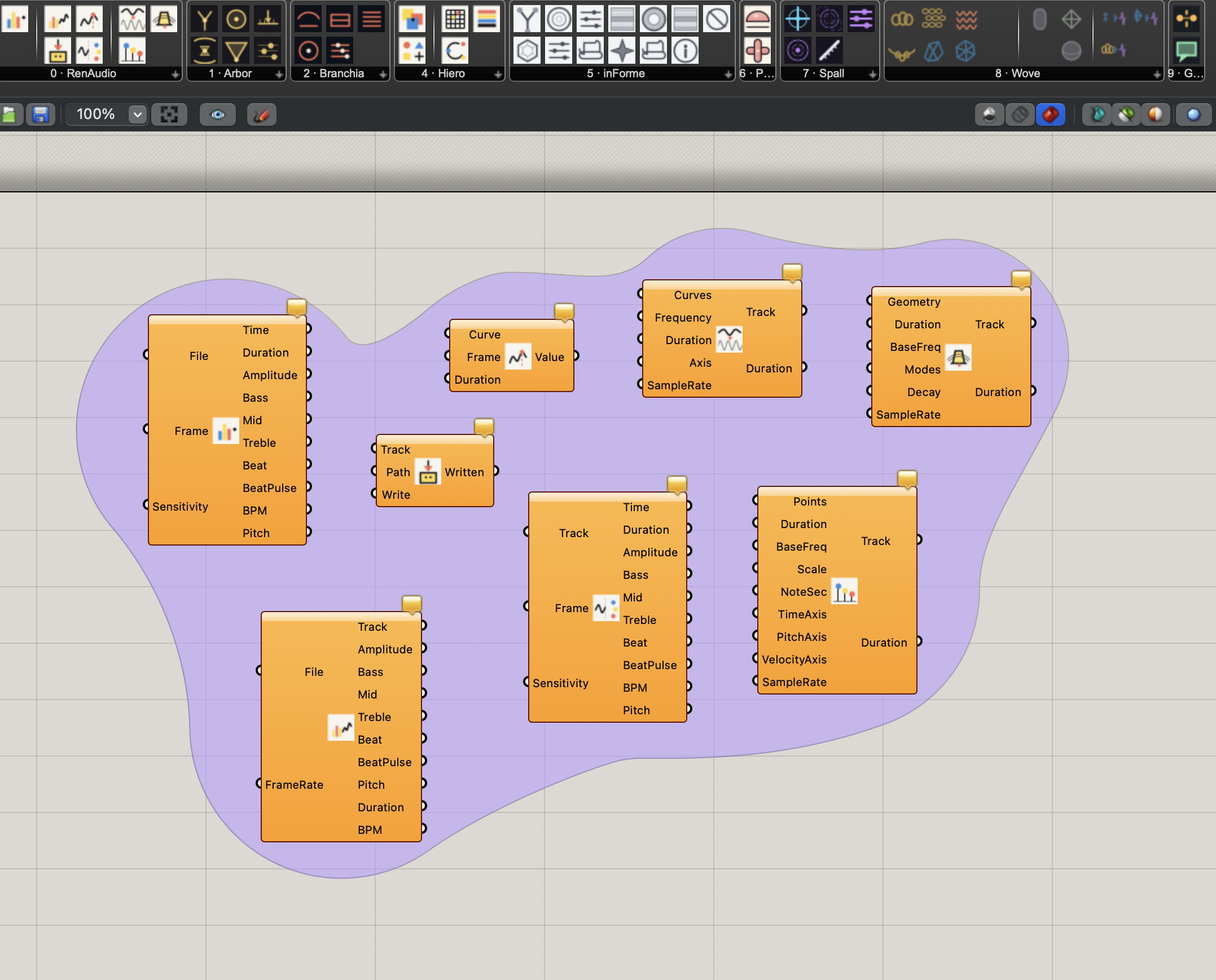
The shared audio engine. One component decodes the file once and exposes its energy as scalars: bass, mid, treble, beat, amplitude, pitch, BPM. You wire the same frame slider into both Hiero and RenAudio, and the two stay phase-locked while you scrub. Right-click Frame → Animate, and you get a PNG sequence that ticks with the song.
The other direction also works. Plug a curve, a point cloud, or a Mesh / SubD / Brep / Surface into one of the synth components and RenAudio MAKES audio out of the geometry: oscilloscope tones from curves, scale-quantized notes from points, modal-bell timbres from solids. That synthesized track loops back into the same engine to drive Hiero, or bakes out as a .wav.
- RenAudio · single component, ten scalar outputs, the canonical 80% wire.
- RenAudio Bake · analyze once, emit per-channel feature curves you can smooth, threshold, or remap before driving anything.
- RenAudio Sample · read any feature curve at a Frame without doing the parameter remap by hand.
- RenAudio Tap · loopback companion, any synthesized Track read back as the same scalars a file would give.
- RenAudio Curve · curves become one-cycle oscilloscope waveforms; multiple curves mix.
- RenAudio Points · point clouds become notes, pitch quantized to a chosen scale.
- RenAudio Solid · Mesh / SubD / Brep / Surface as a modal bell, partials and decay derived from the shape.
- RenAudio Export · bake any Track out to a .wav file (ffmpeg the .wav externally for .mp3).
Hiero
Memphish generator. Sottsassy on a cell grid.
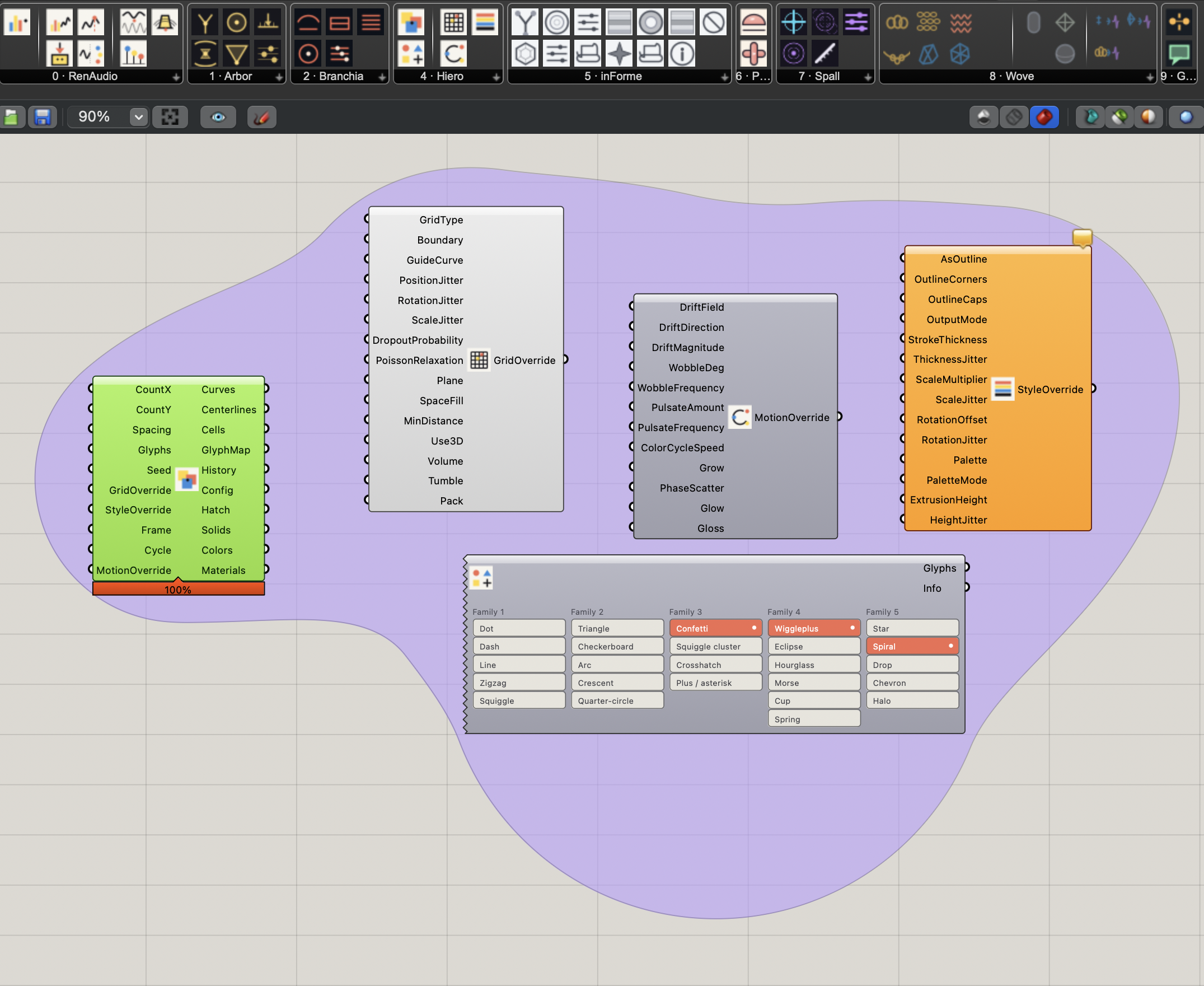
Saturated flat color and asymmetric squiggles laid down on a grid - or scattered in a shape-aware pack, or rotated into a tumble, or morphed glyph-to-glyph as you scrub. Glyphs across several families, weighted-random or deterministic per Seed. The Motion override layers drift, wobble, pulsate, color-cycle, and cumulative reveal on top of the same Frame slider that handles glyph morphing.
- Hiero - main component, ten outputs (curves, centerlines, hatch, solids, colors, render-ready materials).
- Hiero Glyphs / Grid / Style / Motion - four override bundles, each a small mixing console.
- Materials output ships render-ready DisplayMaterial per cell, glow + gloss baked in. Drop it on a Custom Preview and it survives Cycles render.
Wove
Cloth, chainmail, weave, knit - its own engine.
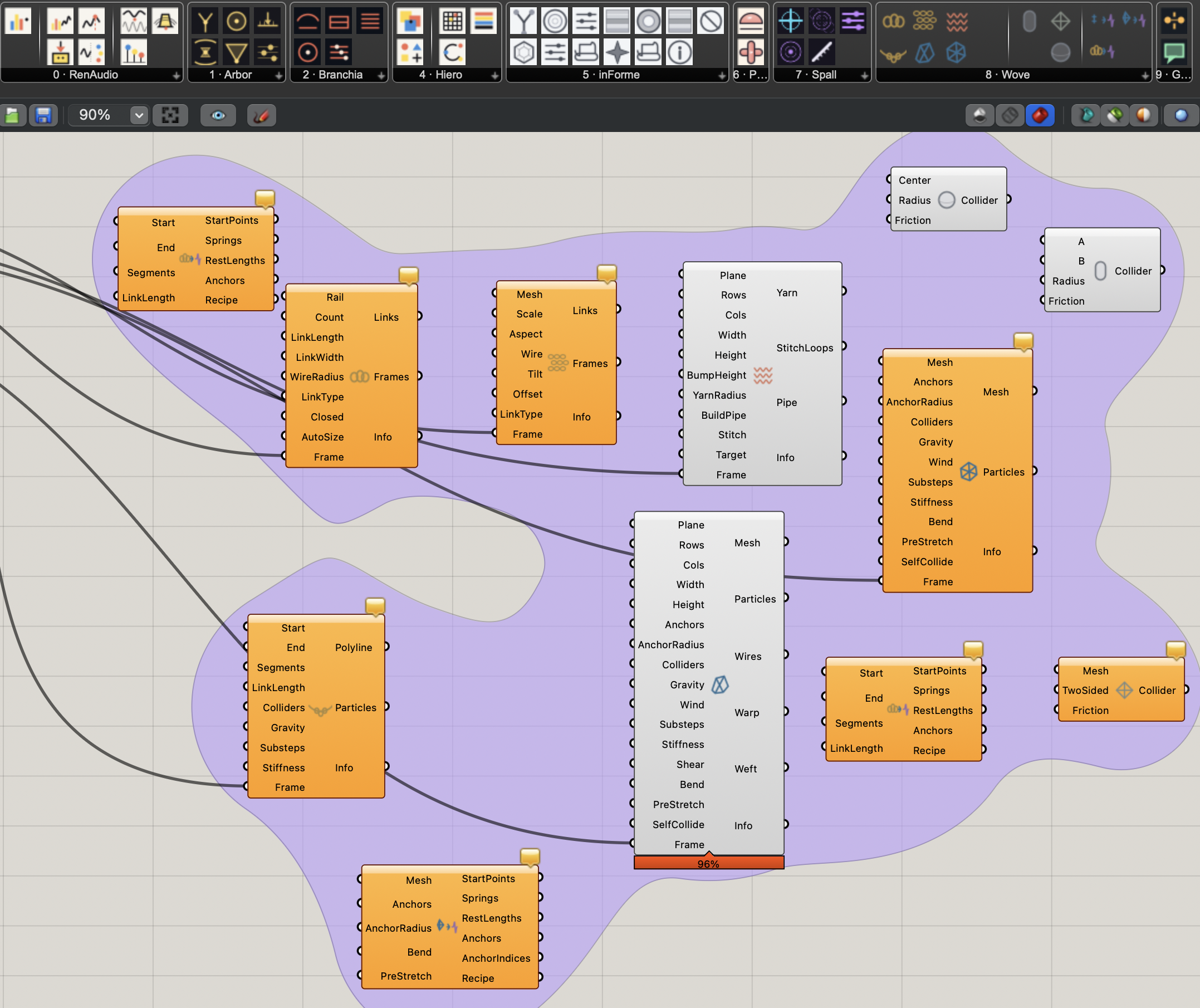
A self-contained PBD textile engine. Drape cloth onto any mesh, build a chain along a rail, drop chainmail rings that actually interlock, weave a continuous warp-and-weft, knit stockinette or garter or rib. Every simulation component carries its own Frame input with an auto-slider on drop, so you can scrub the drape without rebuilding. A yarn-aware Concordance across every component.
- Wove Cloth / Mesh Cloth / Chain Drape - animatable drape with substeps, friction, self-collision.
- Chainmail / Weave / Knit - topology-aware fabrics that wrap a target Surface or Mesh via a UV target abstraction.
- Sphere / Capsule / Mesh / Curve colliders - drop them in the Colliders input on any drape component.
inForme
TPMS and lattice engine. The math describes something that was already there.
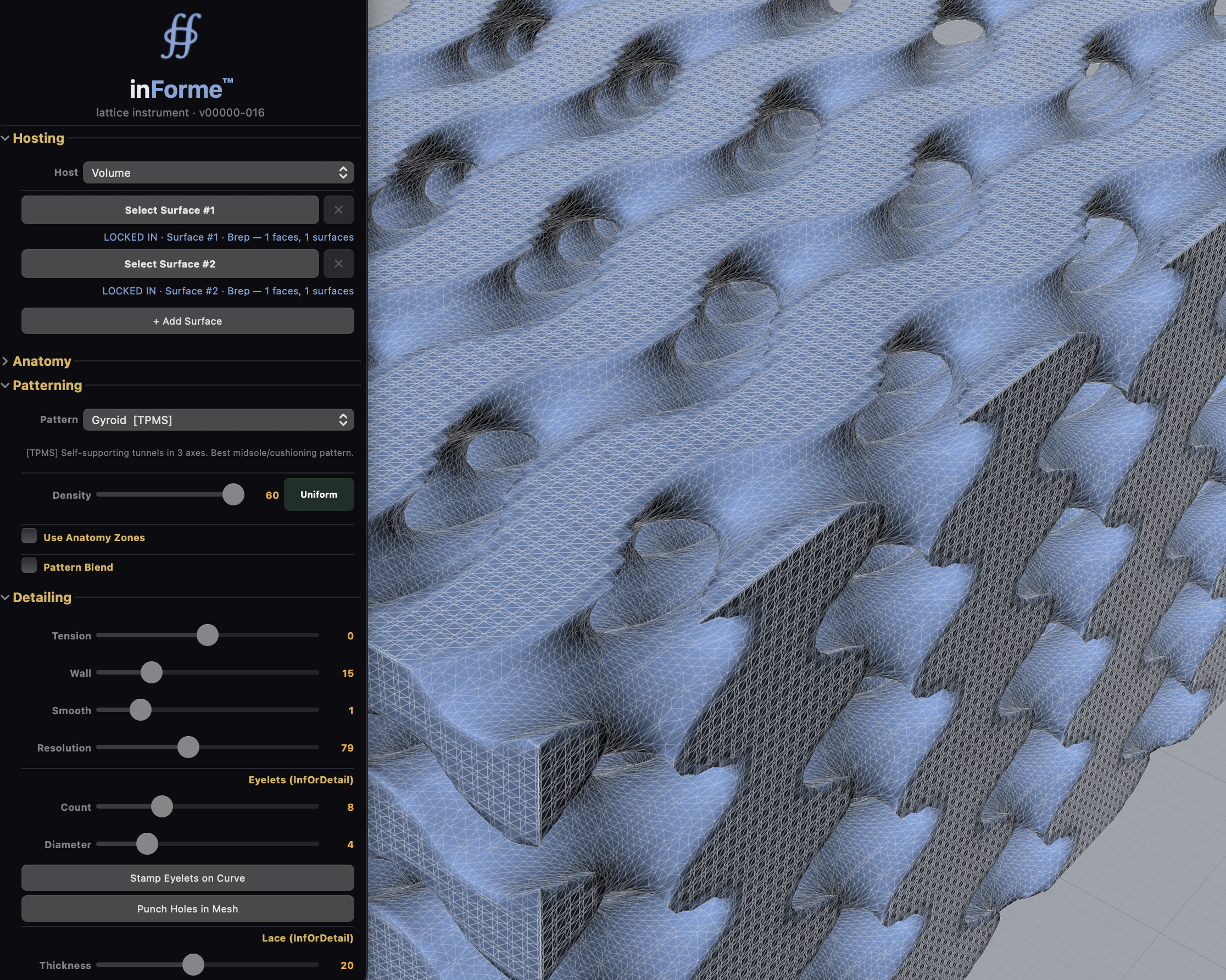
Triply-periodic minimal surfaces and printable lattices fitted into shoes, between surfaces, inside volumes. Gyroid, Schwarz P, Lidinoid, Diamond. Pick your math, set the cell density, get a printable lattice. The shoe-zone vocabulary (heel / arch / ball / toe) is first-class so a midsole can vary density across regions without you lofting it by hand.
- inForme Engine - A surface, B surface, pattern, density, output mesh.
- inForme Shoe / ShoeZones / Tore / Upper - shoe-first shorthand for midsoles + uppers.
- inForme MultiPipe / Conduit - printable filigree from any curve set.
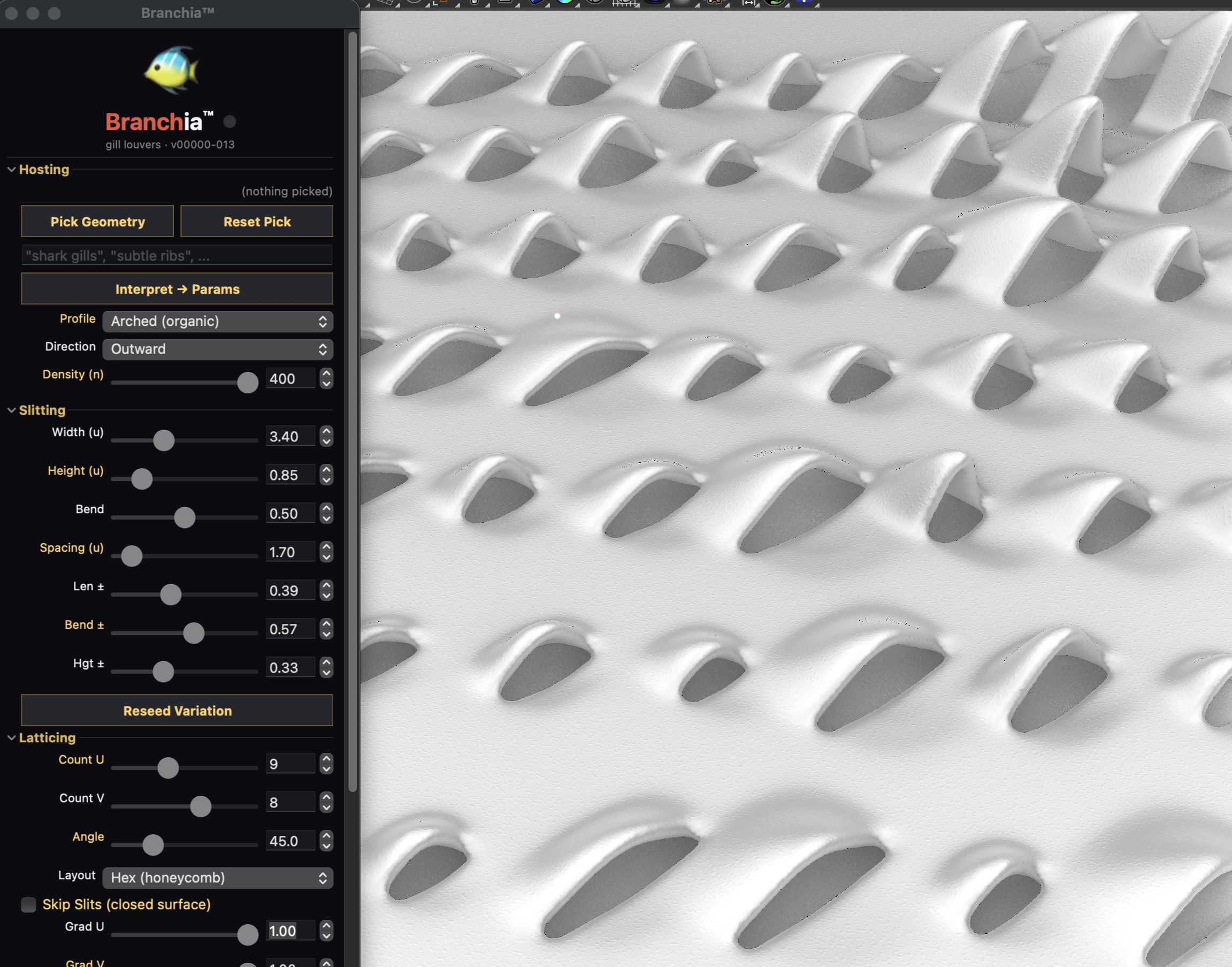
Branchia
Coral reef anatomy as ventilation logic.
The quickest way to answer "wouldn't that look better with gills?" Each blade is placed by the logic that sorts fish anatomy - an angle to the flow, a bend that resolves into a slit. Façades that open the way a reef opens. The biomimicry falls out of the ventilation, not the other way around.
- Branchia Louvers on a surface - bend, not cut.
- UV-aware quad remesh with trim-hole integrity for clipped panels.
- Bran Oracle overlay - local-LLM advisor on what the field is telling you.
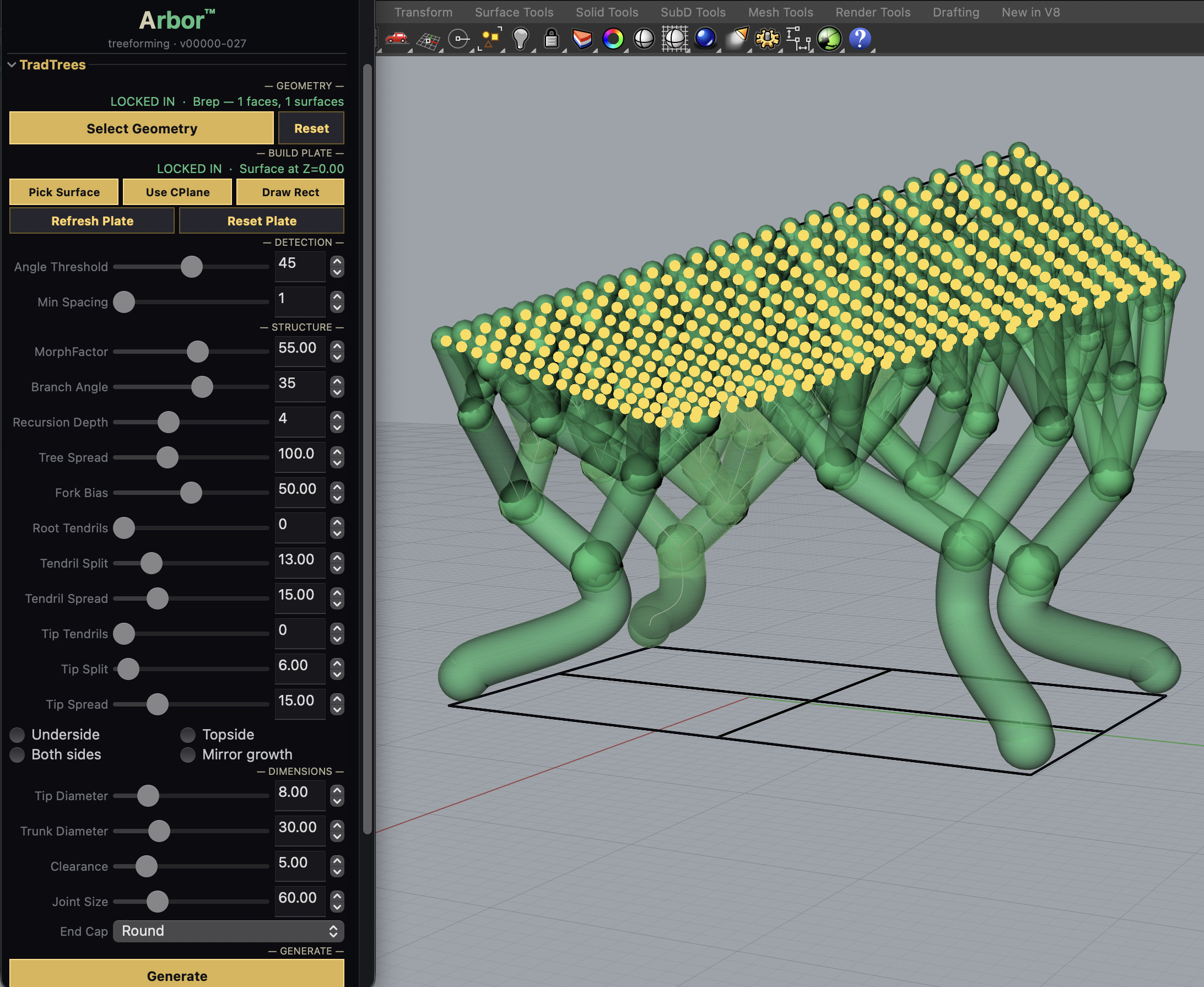
arbor
Tree supports for Rhino. The forest abides.
Not brute columns, not fractals for their own sake - a deliberate canopy that carries weight from wherever it exists down to wherever it's allowed to be. The shortest path is rarely the most stable; the most stable is rarely the most beautiful. arbor draws the compromise on purpose, so the supports are sometimes better-looking than what they're holding up.
- Oracle - finds overhangs (normal filter, downward ray, density cull).
- Branch - grows the skeleton bottom-up, clusters fork, trunks land vertical.
- Eccentric Bridge - mycelium-flavored bridge between two surfaces.
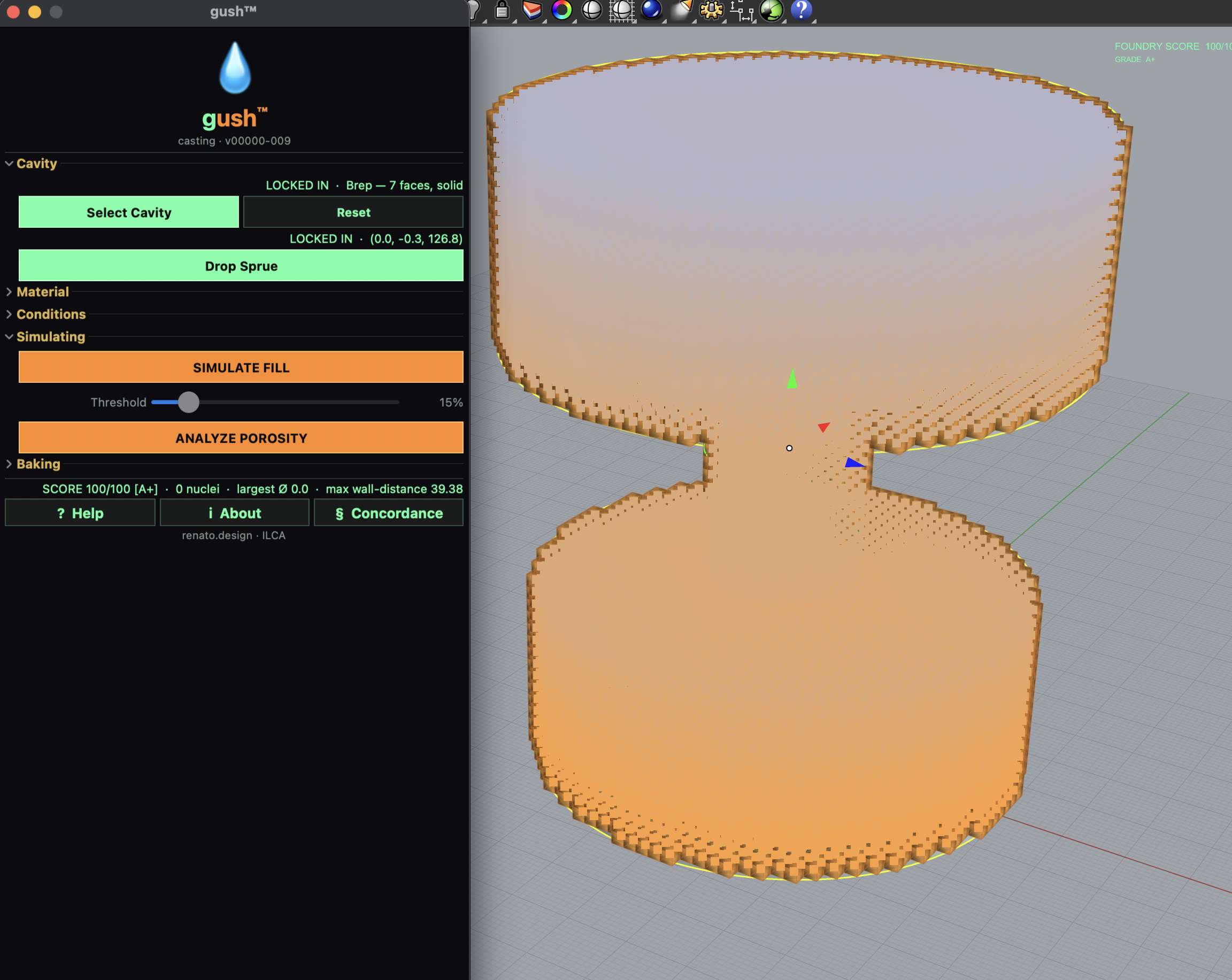
gush
Physical lab. Place a sprue, watch the cavity fill.
gush is a proxy, not a real solver. It's a voxel flow approximation good enough to read where a casting will fail, where a cantilever will yield, where porosity will gather. Material presets carry density, viscosity, yield, Young's modulus. You learn by pouring, not by reading a manual.
- GUSH Flow - voxel cavity-fill with sprue, gravity, pressure.
- GUSH Force - bending-stress proxy with Hot-spot output.
- GUSH Material - presets (annealed, drawn wire, ferric, hollow shell, knapped…).
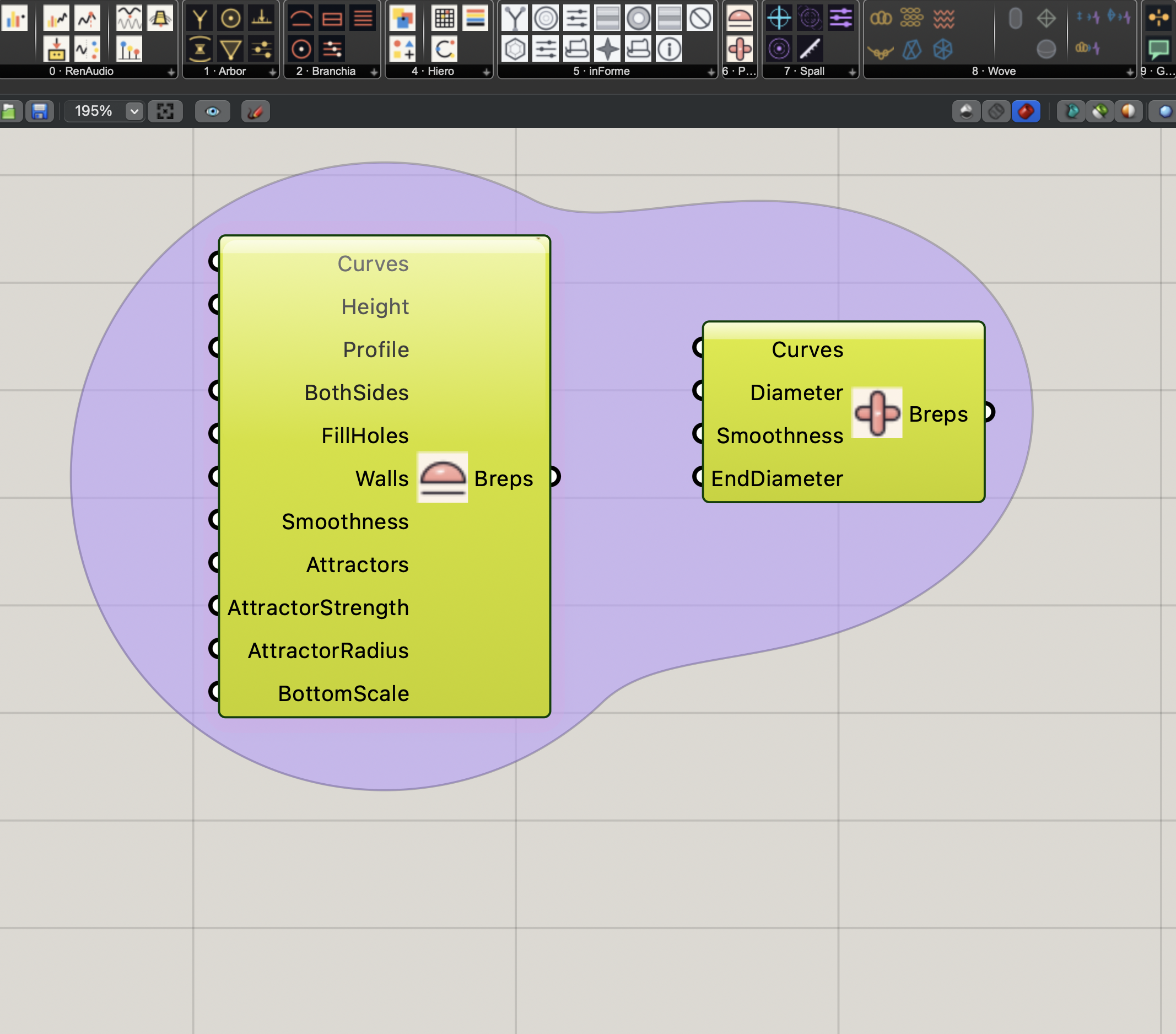
Puffery for Grasshopper
Closed curves into pillow domes; centerlines into smooth pipes.
The Grasshopper components from Puffery - Puff and Swell. Pair with Hiero (Curves → Puff for dome fills, Centerlines → Swell for pipe-and-smooth blobs). Attractors with strength + radius and a BottomScale taper give Puff its variable inflation without leaving the canvas. Swell takes a centerline and gives it volume with optional EndDiameter taper.
Puffery the standalone macOS app, the Blobject creation engine, lives at /puffery/.
- Puff - closed curve → pillow dome with attractors and walls.
- Swell - centerline → fat pipe with smoothness and end-taper.
Spall for Grasshopper
Wave interference surface sculptor. Artifacts of simulated force.
Put a surface inside a simulated wavefield. Sine, shock, crystalline - set the frequencies, set the angle of attack, let the interference chip the geometry the way real spalling chips concrete. Emitters, attractors, obstacles, settings: small components that combine into Chladni-on-surface patterns and other standing-wave figures.
Spall the macOS app, the standalone surface sculptor, lives at /spall/.
- Spall Engine - emitters list + attractors + obstacles + settings → curves, mesh, surface, peaks, nodes.
- Spall Emitter / Attractor / Obstacle - small composable parts.
- Pairs cleanly with inForme MultiPipe for printable filigree.
HerbiBrush
Direct-manipulation mesh sculpting for Rhino. Paint on any surface; live.
A sculpting cabin inside Rhino: paint on a Mesh, SubD, or NURBS surface and watch the surface respond. A dozen-plus brush modes with a custom curve editor, dozens of displacement patterns, and an anti-intersect guard so you don't fold the mesh into itself. Probably the first Rhino plugin with a local-AI sculpting collaborator wired in: SculptAdvisor routes a hundred-plus intents to brush-and-pattern recipes, and GhostBrush will carry one out on its own. ZBrush moves, native to Rhino.
- BrushHub · the panel, brush modes, custom curve editor, displacement-pattern shelf.
- SculptAdvisor · local-LLM intent router - keyword fast-path, recipe library behind it.
- GhostBrush / GhostSculpt · autonomous sculpting on Renato's say-so.
- ImagineSubD · QuadRemesh → SubD pipeline, clean topology by default.
- BrushAIMemory · the local notebook of what got sculpted, persisted across sessions.
Ghosthopper
A side-companion that lives next to the suite.
Ghosthopper is the Renato suite's quiet AI register - a chat panel inside Rhino plus a Grasshopper companion that listens, suggests, and occasionally builds the schematic for you. It knows the rest of the cabinet on this page and tries to be useful without being insistent. More on it later.
Nothing matches that. Try another word, or clear the search.